
Key Takeaways
- DESIGN.md turns design-system context into a repo-local contract that agents can read before touching UI.
- The format combines YAML tokens with Markdown rationale, so agents get both exact values and usage rules.
- It complements
AGENTS.md: one file explains how to work in the repo, the other explains how the product should look and feel. - Treat public DESIGN.md examples as vocabulary and structure, not permission to copy another brand.
DESIGN.md: The Design Contract for AI Agents
You can spot the failure in the first five seconds.
The product team asks an AI coding agent for a new settings page. The agent gets the routes right. It wires the form correctly. The buttons work. But the screen looks like it belongs to a different company: the wrong blue, generic rounded cards, too much shadow, font weights that feel copied from a SaaS template.
The problem is not that the model cannot write CSS. The problem is that visual identity usually lives outside the context window. It is scattered across Figma files, brand PDFs, screenshots, Tailwind configs, Storybook examples, and the judgment of whoever built the last screen.
DESIGN.md is an attempt to make that missing context portable: a design contract an agent can read before it touches the interface.
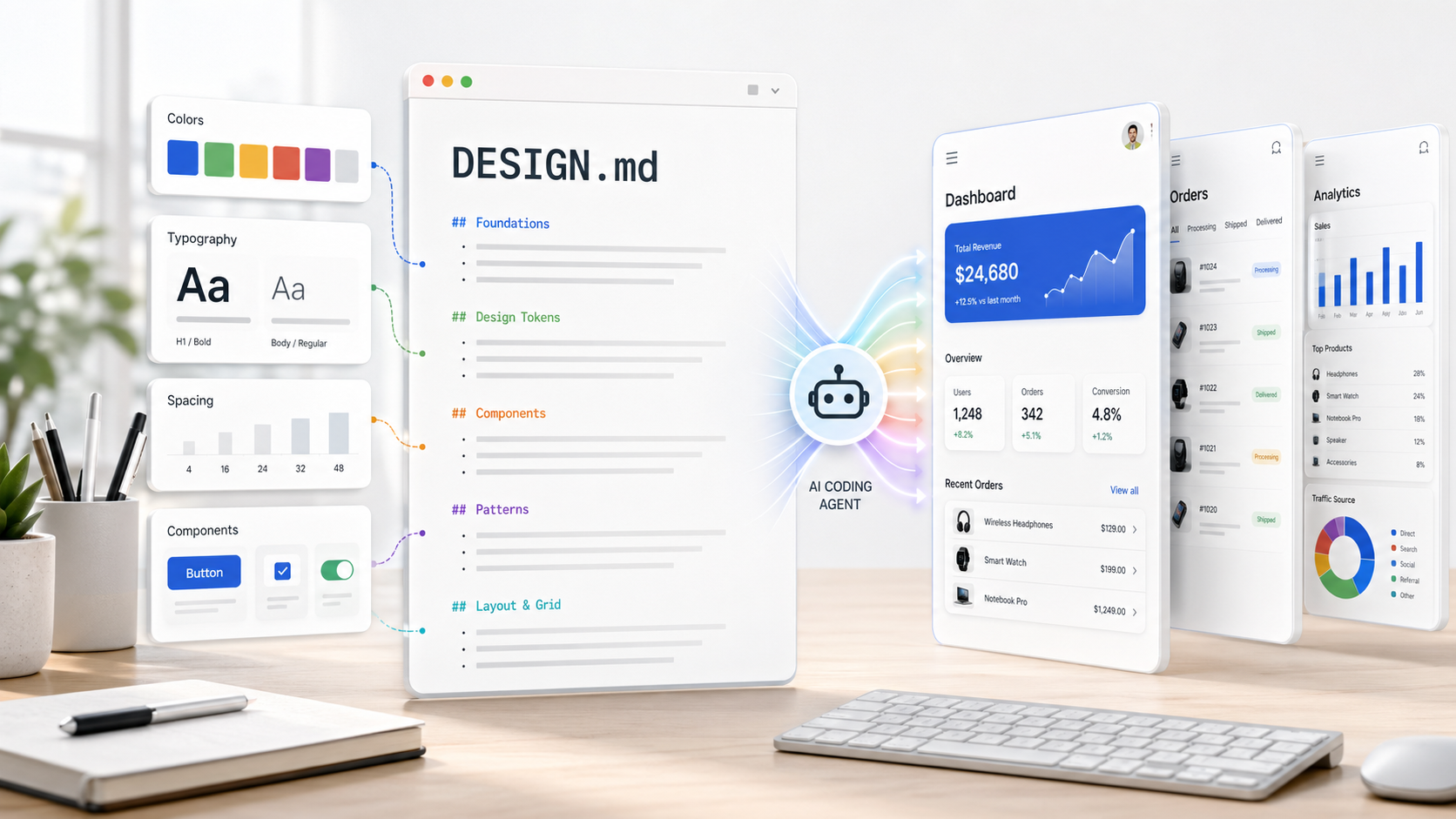
DESIGN.md connects design-system tokens, rationale, and component constraints to generated UI.
Google describes DESIGN.md as a plain-text format for giving coding agents a persistent, structured understanding of a design system. In Stitch, it lets teams export or import design rules between projects, so Stitch can understand not only the raw values, but the reasoning behind the design system and generate interfaces that match the brand (Google Keyword, google-labs-code/design.md).
That framing matters. A design system is not only a bag of tokens. It is also a set of decisions:
- Use the primary color only for the main action.
- Keep product surfaces flat, and create hierarchy with borders instead of shadows.
- Use condensed labels for metadata, but never for body copy.
- Do not mix pill buttons with sharp-edged cards.
An agent can copy a hex code from a config file. What it usually lacks is the instruction that turns a value into a decision.
What changed
On April 21, 2026, Google announced that it was open-sourcing the draft specification for DESIGN.md, originally surfaced through Stitch, so the format could be used across tools and platforms (Google Keyword). The public repository defines the format, CLI, linter, diff command, export command, and an alpha status note (google-labs-code/design.md README).
The core file has two layers:
- YAML front matter for machine-readable tokens.
- Markdown prose for human-readable design rationale.
The spec is explicit about the relationship between the two: tokens are the normative values, while prose explains how to apply them (DESIGN.md spec).
---
version: alpha
name: Daylight Prestige
colors:
  primary: '#1A1C1E'
  action: '#B8422E'
  surface: '#F7F5F2'
typography:
  headline-lg:
    fontFamily: Public Sans
    fontSize: 48px
    fontWeight: 600
    lineHeight: 1.1
  body-md:
    fontFamily: Public Sans
    fontSize: 16px
    fontWeight: 400
    lineHeight: 1.6
rounded:
  sm: 4px
  md: 8px
components:
  button-primary:
    backgroundColor: '{colors.action}'
    textColor: '#FFFFFF'
    rounded: '{rounded.sm}'
    typography: '{typography.body-md}'
---

## Overview

Architectural minimalism with a magazine-like rhythm. The interface should
feel quiet, editorial, and trustworthy rather than playful or decorative.

## Colors

- **Primary (#1A1C1E):** Deep ink for headlines and dense reading surfaces.
- **Action (#B8422E):** Used only for the most important action on a screen.
- **Surface (#F7F5F2):** Warm page background, softer than pure white.

## Components

- **Primary buttons:** compact, sharp, and action-colored. Use one per view.
- **Cards:** flat white surfaces with subtle borders, not heavy shadows.
This is a small file with a large practical effect. The token block gives an agent exact values. The prose gives it taste, hierarchy, constraints, and negative examples.
Why this matters for agentic UI work
Before DESIGN.md, teams had three imperfect ways to give agents design context.
| Approach | What works | What breaks |
|---|---|---|
| Paste a style guide into the prompt | Fast for one-off tasks | Repeated every session, easy to forget, expensive in tokens |
| Point the agent at existing code | Good for implementation details | The agent sees what exists, but not why it exists |
| Export tokens from design tools | Precise values | Weak guidance on semantic use, composition, and anti-patterns |
Use DESIGN.md | Values and rationale travel together | Still alpha, still needs tooling and review |
The important shift is from visual memory to visual contract. AGENTS.md tells a coding agent how to build the project. DESIGN.md tells a design or coding agent how the project should look and feel. VoltAgent's awesome-design-md project makes this comparison directly and curates ready-to-use examples inspired by public websites (VoltAgent/awesome-design-md).
This does not remove the need for designers. It changes what designers can hand off. Instead of hoping the agent infers a product's visual grammar from scattered examples, the designer can version a compact source of truth in the repository.
The lifecycle: extract, write, lint, generate
A practical DESIGN.md workflow loops from extraction to review, then back into the contract.
A practical workflow looks like this:
- Extract recurring visual decisions from an existing product, Stitch screen, Figma export, CSS theme, or screenshot audit.
- Write
DESIGN.mdwith both tokens and rationale. - Lint the file for broken references, section problems, and contrast issues.
- Generate new UI with the file in context.
- Diff changes to catch regressions when the design language evolves.
Google's CLI supports this shape directly:
npx @google/design.md lint DESIGN.md
npx @google/design.md diff DESIGN.md DESIGN-v2.md
npx @google/design.md export --format tailwind DESIGN.md > tailwind.theme.json
npx @google/design.md export --format dtcg DESIGN.md > tokens.json
The linter is more than a parser. The README lists rules for broken token references, missing primary colors, component contrast ratios below WCAG AA, orphaned color tokens, missing typography, missing optional sections, and section order (google-labs-code/design.md README).
That is important because agentic design work should be reviewable. If an agent changes button-primary.textColor, CI should be able to say whether it broke contrast. If someone removes a token that components reference, the failure should be structured JSON, not a visual surprise in staging. This is the difference between "the agent made it prettier" and "the agent made a change that passed the design contract."
How the format is structured
The official section order is:
- Overview
- Colors
- Typography
- Layout
- Elevation & Depth
- Shapes
- Components
- Do's and Don'ts
Sections can be omitted when irrelevant, but present sections should follow that order (DESIGN.md spec). Unknown section headings should be preserved rather than treated as hard errors. Duplicate section headings are errors. Unknown component properties are accepted with warnings, which gives the format room to evolve without making every early file brittle.
The token schema is intentionally small:
colorstypographyroundedspacingcomponents
The spec uses curly-brace token references such as {colors.primary} and {typography.body-md}. For most token groups, references point to primitive values. Inside components, references to composite values are allowed (DESIGN.md spec).
This makes the file close enough to existing design-token practice to interoperate, but text-native enough for an LLM to read without a specialized design API.
Why not just use design tokens?
Design tokens already solve a real interoperability problem. The Design Tokens Community Group's 2025.10 format report describes tokens as a way to express design decisions in a platform-agnostic way, share them across disciplines and tools, and reduce bespoke glue code between design and development systems (Design Tokens Format Module 2025.10).
DESIGN.md does not replace that work. It sits one layer closer to agents.
Design-token files are excellent for translation tools. A token pipeline can turn color.text.primary into CSS variables, Android resources, iOS assets, or Tailwind config. But an agent needs more than token translation. It needs to know that:
tertiaryis an accent, not a background.rounded.fullis only for chips and avatars.- A dashboard can be dense, but a checkout flow should be calmer.
- A shadow token exists for popovers, not for every card.
The official export command acknowledges this relationship by converting DESIGN.md tokens to Tailwind and DTCG outputs (google-labs-code/design.md README). The file can be agent-readable at authoring time and token-compatible at build time.
getdesign.md as a distribution layer
getdesign.md is worth looking at separately because it shows what happens when DESIGN.md stops being only a spec and becomes a browsable artifact.
The site packages the format as a design-system inspiration catalog: 69 files as of April 26, 2026, grouped by recognizable product categories, with entries for tools like Vercel, Stripe, Figma, Notion, Supabase, Linear, Claude, Sentry, Apple, IBM, Spotify, Tesla, and others (getdesign.md). The pitch is simple: drop a DESIGN.md into your project and let an AI coding agent build matching UI.
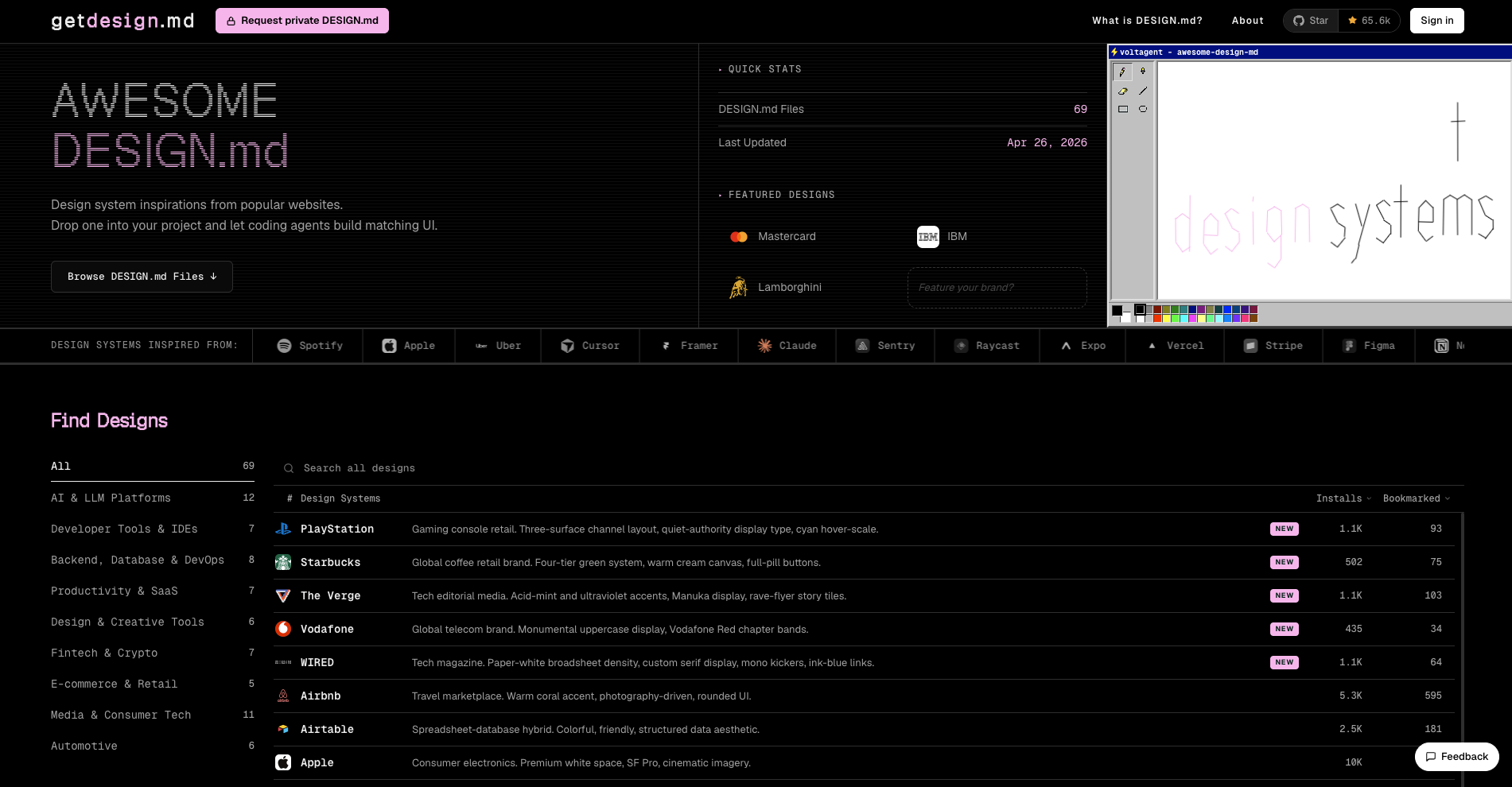
getdesign.md turns DESIGN.md files into browsable examples with visual previews.
The IBM entry is a good concrete example. Its page gives builders a one-command install path, npx getdesign@latest add ibm, and clearly labels the file as an unofficial, curated starting point for IBM-like UI work. The positioning is specific enough to be useful: enterprise technology, Carbon-style structure, a disciplined blue palette, and structured corporate interfaces (getdesign.md IBM example).
That matters for three reasons.
First, the catalog gives builders examples of good design language. Many teams do not know how to write "atmosphere" or "component behavior" in a way an agent can use. Seeing a file that describes a developer tool as monochrome, code-forward, high-density, and border-driven is more useful than seeing a raw token list.
Second, the preview pages make the contract inspectable. A DESIGN.md file is text, but design judgment is visual. getdesign.md pairs the files with HTML previews so users can see color swatches, type scale, buttons, cards, and dark-mode behavior before handing the file to an agent (VoltAgent/awesome-design-md).
Third, the private request flow points to a service category: design-system extraction for AI builders. The request page offers private, website-specific DESIGN.md generation and a larger "Vibecoder kit" that packages a starter website around the extracted style (getdesign.md request page). Whether that exact product category wins or not, the workflow is clear: analyze a site, extract its visual system, generate an agent-readable contract, then use that contract to steer implementation.
The caveat is important. getdesign.md is best treated as a learning and inspiration layer, not a license to clone another company's identity. For a serious project, the safer workflow is:
- Study two or three public
DESIGN.mdfiles to learn the vocabulary. - Extract your own product's colors, type, spacing, surfaces, and states.
- Write your own roles and constraints, not just copied values.
- Generate previews and screenshots before letting the agent ship UI changes.
- Keep the file versioned so design changes are reviewed like code.
In other words, getdesign.md is not the destination. It is the gallery, the template library, and the proof that DESIGN.md can be treated as a reusable asset.
What this means in practice
If you build with AI coding agents, add DESIGN.md beside your implementation instructions.
At minimum:
my-app/
├── AGENTS.md       # How to work in this repo
├── DESIGN.md       # How the UI should look and feel
├── package.json
└── src/
Then make the agent read both before touching UI code:
Before editing frontend files:

1. Read AGENTS.md for repo workflow.
2. Read DESIGN.md for colors, typography, spacing, shape, depth, and component rules.
3. Use DESIGN.md tokens when creating or changing UI.
4. If DESIGN.md is missing a needed rule, propose the smallest addition before inventing a new visual pattern.
For teams, the best use is not "generate a pretty page." It is design drift control.
Use DESIGN.md when:
- Starting a new product from a known visual system.
- Moving from design exploration to implementation.
- Asking agents to refactor legacy UI without changing the brand feel.
- Creating new pages in an existing product.
- Reviewing agent-generated UI for consistency.
Do not use it as:
- A replacement for component source code.
- A full Figma document export.
- A license to copy another company's visual identity.
- A substitute for accessibility testing in the actual rendered app.
A good DESIGN.md is opinionated
The worst version of DESIGN.md is a token dump. The best version reads like a designer sitting next to the agent.
It names roles, not just colors:
- **Action Crimson (#B8422E):** Reserved for one primary action per screen.
- **Limestone Surface (#F7F5F2):** Used for page backgrounds, never for cards.
It explains hierarchy:
Use flat cards with 1px borders for grouped content. Reserve shadows for
menus, dialogs, and surfaces that physically float above the page.
It gives negative examples:
Do not use gradient CTAs. Do not introduce a second accent color. Do not use
large rounded cards in dense operational tables.
It maps components:
components:
  card-default:
    backgroundColor: '#FFFFFF'
    textColor: '{colors.primary}'
    rounded: '{rounded.md}'
    padding: 24px
  chip-selected:
    backgroundColor: '{colors.action}'
    textColor: '#FFFFFF'
    rounded: '{rounded.full}'
The test is simple: if a new agent reads the file, can it produce the next screen without guessing the brand?
My current read: DESIGN.md is most useful when treated like a compact contract, not a universal design database. It should define the portable visual grammar that every agent and contributor needs before touching UI.
Takeaways
- Put
DESIGN.mdin the repo, nearAGENTS.md, so implementation and visual rules travel together. - Keep the file small enough for agents to read, but specific enough to prevent generic UI.
- Use both tokens and prose. Values without rationale do not teach the agent how to choose.
- Run the linter in CI once the workflow matters.
- Treat community files as examples of structure and vocabulary, not as permission to copy a brand.